Perils are a reality of life. As much as we don’t like to think about it, there are many hazards on life’s journey that can seriously hurt and even destroy us. From the threat of physical injury to psychological harm, we never know what a day might bring forth.

Now, As Mark Twain famously put it, “I am an old man and have known a great many troubles, most of which never happened.” To live in constant fear of danger and trouble is debilitating and probably one of the worst of perils, and my purpose is not to stir up anxiety. But as Proverbs says, “The prudent sees danger and hides himself, but the simple go on and suffer for it.” So it is wise to have an understanding of dangers ahead and take preventative measures. Benjamin Franklin gives us good advice by reminding us that, “An ounce of prevention is worth a pound of cure.” We need not live in fear, but we also ought not be naive.
One of the duties of the father and husband of a home is to protect his family from peril, as much as he is able. I am in favor of taking the right kind of calculated risks in life, as this is a vital and necessary part of living out the story in which God has placed us. However, I also have a responsibility to teach and warn my children about the dangers of taking unnecessary risks. My children must learn not to be foolish when it comes to things like driving a vehicle, proper handling of firearms, going out alone in certain places, or using a chain saw, in order to reasonably protect them. I want to protect my people, and this is good and normal.
In our day, one of the greatest threats to our families is the internet. While, on one hand, it is one of the greatest blessings in history, the ability to “go online” at any time and in any place opens the door to countless dangers. There is no need for me to list the hazards that await our loved ones online. Unless you are living on the moon, purposely “off the grid” with your head buried in the lunar sand, at this point we are all well aware.
It is the responsibility of the leadership in a home to navigate these waters properly. So how is this to be done?
Well, we are all still trying to figure that out, aren’t we.
One option is to open the window of the highest room in your abode and gleefully throw all of the gadgets and gizmos out of that window, one by one, letting out a deep belly laugh and cry of victory as each item breaks into a thousand pieces on the unforgiving pavement below. I imagine you have had that urge as well.
Unfortunately, life is not so effortless and uncomplicated. All of God’s good gifts are dangerous, and we as His people must learn to master them and take dominion. And this includes the internet. We need to learn how to manage this wealth, harnessing its power for the purpose of destroying evil and doing good, and we need to teach this to our children. When the Lord said the meek would inherit the earth, He knew this would include the internet. (Or whatever technological advancements await us in the future.)
So, in an attempt to be a help in this area, I am going to share how we are currently navigating these waters in our own home. My fourth child has just obtained his first phone, so this prompted us to reassess what we are doing, and has occasioned this post. I would love to hear your own ideas and thoughts in the comments, so please feel free to share.
(I am receiving no benefits from any of the companies or products that I name or link to in this post. I am simply passing on to you what is presently working for us.)
Mobile Devices
First, I recommend waiting as long as possible before allowing a child to have his own phone. But there does come a day when it is needed. For different families and different circumstances that timing can vary. Most of our young people got their first phone when they began driving on their own. (This does not necessarily mean they got internet or social media, as discussed below.)
When it does come time to get Johnny that first mobile, here are some thoughts. Our family has always chosen to use Apple’s iPhone, mainly because of the parental controls. With these built in safeguards, a parent or guardian can have as much or as little control over the child’s device and online activity as they want. Here is a brief rundown of what is available on iOS (Apple’s mobile operating system) devices:
- Downtime: schedule a “downtime” for the days and times you select, where only apps that you choose to allow will be available (such as phone and text). For example, this is great for knowing that apps are not available through the night when everyone is asleep.
- App limits: Does your son tend to spend too much time on a gaming app? Is your daughter texting a friend way too often? Easily set time limits for the app.
- Communication Limits: Limit whom your child can communicate with on the device.
- Content and Privacy Restrictions: The parent or guardian has complete access to and control of the apps the child has on their phone. You can allow or block installing of apps, deleting apps, and in-app purchases. You also have control over what is allowed with music, podcasts, movies, TV shows and other media. You can set restrictions on web content, turn the internet browser off altogether, or allow only specific sites. Note: If you turn the App Store off, then you can remove any app from the phone and the child is not able to restore the app until the App Store is turned back on again.

Our son who just received his first phone is only allowed to have phone and text messaging, “basic” apps such as calendar, calculator, maps, and a few other selected apps for gaming and listening to music. He can request apps, but we have to approve them before he is able to download them. We do not allow a browser or any social media (including YouTube) at this point.
One important note: any sort of safeguards or accountability software have to be maintained. Another very handy feature on the iPhone is that all of these controls on your child’s iOS device are able to be accessed remotely using your own iOS device. You don’t have to go and retrieve your child’s device every time you need to make changes or view his activity. This makes it very convenient to keep up with your child’s device.
One other note: I know that Android phones also have privacy restrictions; however, from what I have read, Android devices are far easier to hack into (by your tech-savvy child, or by malware) than Apple devices. This is mainly because Android software is open source, allowing the device to be “hackable” on purpose. Apple devices are completely different. An individual has to go to some pretty extreme measures to be able to get into the privacy restrictions of an Apple device.
We also let our young people know that Dad (and Mom if she wishes) will be doing random phone checks, when Dad will inspect what has been happening on that little rectangular box over the last couple of weeks or so. They need to know that whatever conversations take place can potentially be viewed by Dad at some point. Of course, this invasion of privacy lessens more and more as the child gets older. Yes, it is an invasion of privacy without apology. Our home is not a free democracy, but more of a joyful, benevolent dictatorship. And this is how it should be. Men of God should strive to be, “good managers of their children and their own households.” (1 Timothy 3:12)
By the way, these “parental controls” do not have to be available for children only. There is no reason why fathers (and mothers) cannot have someone we have designated to be our “device supervisor” and turn some or all of these settings on for us as well. It is good to have these controls available if needed.
Other Mobile Options
If you want your child to have a phone for making calls and texting, but without the option for internet access at all, here are a couple of devices I have read about, which may be a good choice for some families:
- Gabb Phone: allows phone, text, music, photos, etc, but no internet and no social media.
- Wisephone: has phone, text, clock, calculator, maps, and camera, but no internet and no social media. (Does not work with Verizon Wireless presently.)
Do you know of other good options? Technology is constantly improving and changing, and I would love to hear of other such technology.
Computers and Other Hardware
Chromebook for Younger Children
One of the hurdles families face is what to do with younger children when it comes to having their own device for playing some games, listening to audio dramas, and even doing some school work. We got very tired of fighting the “But it’s my turn to use the iPad!” (set with parental controls of course) battle and began seeking for a device that each of the children could have as their own. (And would not break the bank!)

I checked into Google Chromebooks, mainly because they can be quite inexpensive. I then discovered that Google has an app called “Family Link,” which is Google’s parental control app. We decided to go this route, and so far it has worked out just fine for us. We purchased some very inexpensive used Chromebooks on Ebay (they were in the $75 to $150 price range) and set up the Family Link app for each child and their Chromebook laptop. Like the Apple iPhone, I have complete control over each Chromebook with this app, and I’m not too worried about my 6, 8, or 9 year old hacking into the device. This is also nice because the Chromebook acts as a semi-mobile device and can be taken on trips as well as used in the home.
One issue we had was that Google would not allow certain restrictions once a child reached a certain age. (Thanks Google for deciding that for me…) So, unless you are going to lie about your children’s ages, Family Link is only good for younger kiddos, not teens.
Router with Access Controls
Some years ago we installed a router in our home that also has powerful built in parental controls. We chose a router called Synology which I can log into on my laptop or on my phone and again, have much of the same kinds of controls available on the iPhone OS, such as downtime, app limits, content restrictions, etc., but on any device that is using our home router.
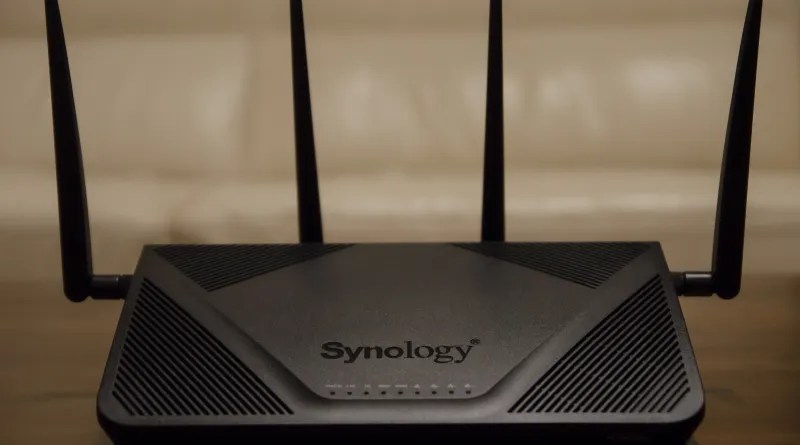
Of course this is only helpful on devices that are not mobile, such as desktop computers. So you would still need parental controls for mobile devices, even with a router setup such as this.

Important note: it is not necessarily an easy task to set this up. We found that you must be determined and not give up easily to get something like this working properly. But once it’s done, it’s done, and it works great. It would be worth paying a professional for help if needed. Who can put a price on protecting your child’s soul to the best of your ability?
Accountability Software
Covenant Eyes
Our family has had a Covenant Eyes subscription for years. All of our computers have Covenant Eyes installed on them. I appreciate the effort that the folks behind this company have gone to in order to provide this functional accountability software. They really have improved over the years. I am glad to be able to support this company.

In short, Covenant Eyes takes screenshots of whatever device it is installed on. Recently, this also includes iPhones. Your accountability partner (or “allies” as Covenant Eyes calls it) gets a report of your activity as often as they want, and is able to scroll through the screenshots. It will give a notification if something has been flagged as a “potentially concerning event.” I love this because, as you are on your device through the day, you are always aware that someone else is going to be seeing what you have been doing. It’s a great deterrent to keep your loved one from wandering off somewhere they should not be.
Social Media
We have decided to not allow our children to be on social media until they are 18 years old. This is something we have only recently put into place as a hard and fast rule. Like I said, we are all still trying to figure all of this out.
The culture tells us that we need social media. This pressure is only going to get stronger as the technology keeps moving forward. Social media feels more and more like an extension of ourselves. But there are times when we must rise above the culture and do what is best for our people, even if it seems “odd.”
Remember that an individual can talk to anyone and see pretty much anything on social media. Any app that has built-in messaging is a danger for teens. I am not saying social media is all bad, but it is definitely hard to control, and most 14-year-olds I know don’t have a snowball’s chance in hell in controlling it properly.
There are many other things we could discuss, but I hope this post is helpful in some way to you. Maybe even one idea here can spark an idea with your own family. Again, I would love for you to comment on this post with your own ideas, or things you have implemented into your home to help protect your loved ones. Sometimes the comments section of a post can be as helpful as the post itself, so if you have a thought, please leave it in the comments section for others to read!

Subscribe to receive new posts in your inbox.
Discover more from Steve Hall
Subscribe to get the latest posts sent to your email.
 Steve Hall